PSTN agents: let any phone number take calls from your queues
Your Purple+ queue can now ring any phone number, inside or outside your organization. Each number rings for 25 seconds, whoever picks up presses 1 to accept, and voicemail never takes the call.
By Rob Jeninga, COO at Purple
After 18:00, most queues go quiet
A call queue rings the agents who are signed in. At 18:00 they sign out, and 24/7 support becomes a workaround. An engineer keeps a laptop open at the kitchen table. Or the queue forwards to one mobile number and everyone hopes it gets picked up. If that phone is on silent, the call lands in voicemail. Nobody knows until the next morning.
Introducing PSTN agents in Purple+
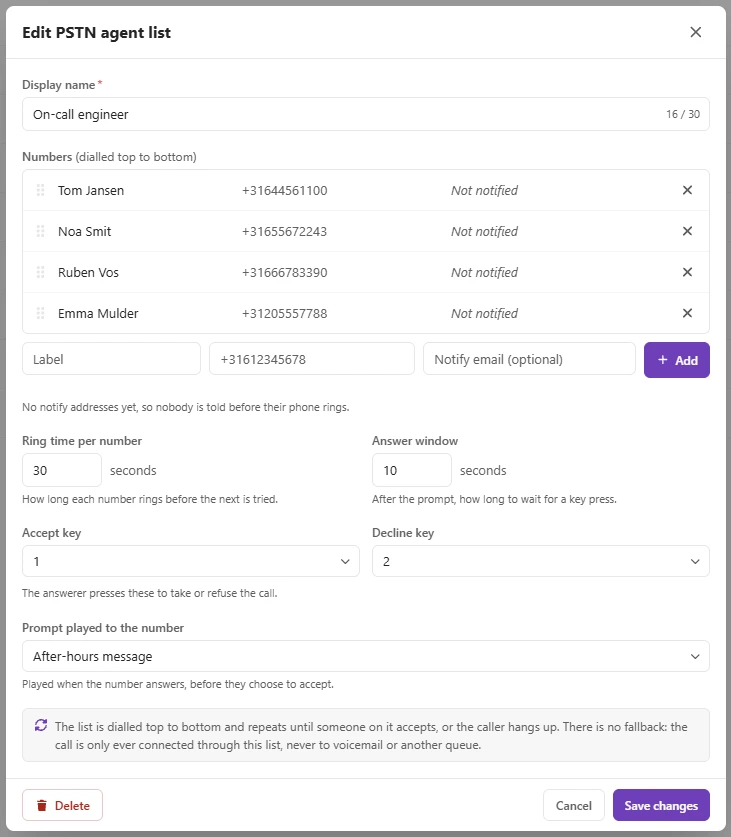
A PSTN agent list is a list of plain phone numbers. Mobiles, landlines, a partner's number, in any country. The people on it need nothing but that phone. No Purple+ login, no laptop.
You attach the list to a queue: outside business hours, on public holidays, as a choice in your menu, or on a schedule. Purple+ then dials the numbers one by one, top to bottom. Each number rings for 25 seconds by default, and you can set 5 to 120. Whoever picks up presses 1 to take the call, or 2 to pass. A voicemail box cannot press 1, so it counts as no answer and the next number rings. The list repeats until someone accepts. The caller hears your own hold music while it does.
The 24/7 support desk
Your desk promises 24/7, but at 18:00 the last engineer signs out. From then on the queue rings the on-call list: the engineer on duty first, then the backup. At 02:10 a customer calls the support number they always call. They hear the familiar greeting, then the on-call engineer who pressed 1 on a mobile. New rota on Monday? The queue manager moves next week's name to the top.
The breakdown line
Your technicians are on the road all day, and a breakdown cannot wait. In your menu, planning goes to the office. Breakdowns go to the list: the technician on standby, then a colleague, then the partner you call in when your own people are full. The caller hears hold music. The technician accepts from the van and is on the way before the office knows.

Good to know
- Included in Purple+ and available now. No add-on, no extra cost.
- An administrator creates a list under Agent lists in Config, in about a minute.
- A queue manager can change who is on the list without administrator rights, so a new rota does not need IT.
- Ring time per number, the answer window, and the keys for accepting and declining are all yours to set.
- An optional prompt tells the person who picks up which line is calling, before they accept.
- Add an email address to a number and that person is notified when the Scheduler hands the queue over.
- There is no fallback. If nobody accepts, the caller keeps waiting with hold music until someone does.
- Every attempt is a normal outbound call, so your usual call charges apply.
Next step
Tell us how your on-call line is arranged today and we will tell you whether this fits your queue. Talk to us about PSTN agents